BOMBANANA Crossplay Guide: Play With Friends on All Platforms
Is BOMBANANA crossplay supported? Learn how to play this chaotic 3-player co-op bomb defusal game with friends across Roblox, Steam, and PC in our guide.
Published:
Table of Contents
Introduction to the Chaotic World of BOMBANANA!
If you are looking for a game that tests the absolute limits of your friendships, look no further than BOMBANANA!. This asymmetric co-op experience takes the high-stakes tension of bomb defusal and adds a hilarious, primate-themed twist. But before you dive into the panic of cutting wires and shouting instructions, you likely have one major question: is bombanana crossplay supported? In an era where gaming squads are often split between different hardware, knowing whether you can connect with your friends on various platforms is essential for a smooth gameplay experience.
BOMBANANA crossplay functionality is the bridge that allows players to step into the roles of the blind, deaf, and mute monkeys regardless of their preferred device. Whether you are accessing the game through its official Roblox presence or the standalone Steam version, understanding the multiplayer architecture is the first step toward a successful (or explosively funny) mission. This guide will break down everything you need to know about playing together, the specific roles involved, and how to manage the unique communication hurdles the developers at Lefto Studio and TARK Games have designed.
Quick answer
BOMBANANA! is primarily a 3-player online co-op game. While the Roblox version inherently supports cross-platform play between PC, mobile, and consoles, the Steam version (Windows/macOS) currently does not have confirmed cross-platform connectivity with other ecosystems. Exactly three players are required for every session.
Is BOMBANANA Crossplay Supported? Platform Breakdown
The answer to the bombanana crossplay question depends largely on which version of the game you are playing. Because the game exists in two distinct environments—the Roblox platform and a standalone Steam release—the networking rules differ.
The Roblox Version
On the Roblox platform (Place ID: 93467044568807), bombanana crossplay is a native feature. Roblox is built to allow users on PC, Mac, iOS, Android, and consoles (like Xbox and PlayStation) to play together in the same "Place" seamlessly. If you are playing the Roblox version developed by TARK Games, you can invite friends regardless of their device.
The Steam Version
For the standalone version published on Steam by Lefto Studio, the situation is more restricted. Currently, the game is confirmed for Windows and macOS. According to community reports and official Steam listings, crossplay between Steam and other platforms (like consoles or the Roblox version) is not currently supported. However, Windows and Mac users on Steam can play together via the standard Steam invite system.
Version
Platform
Crossplay Status
Multiplayer Type
Roblox Version
PC, Mobile, Console
Supported (Native Roblox)
Online Co-op (3 Players)
Steam Version
Windows, macOS
Limited (PC to Mac only)
Online Co-op (3 Players)
Console Standalone
N/A
Not Confirmed
N/A
Understanding the 3-Player Multiplayer Mechanic
One of the most unique aspects of this game is its rigid player count. You cannot play this game solo, and you cannot play it with a duo or a squad of four. The game is meticulously balanced for exactly three participants. This makes bombanana crossplay even more important, as you need to find two specific friends who are available at the same time to fill the roles.
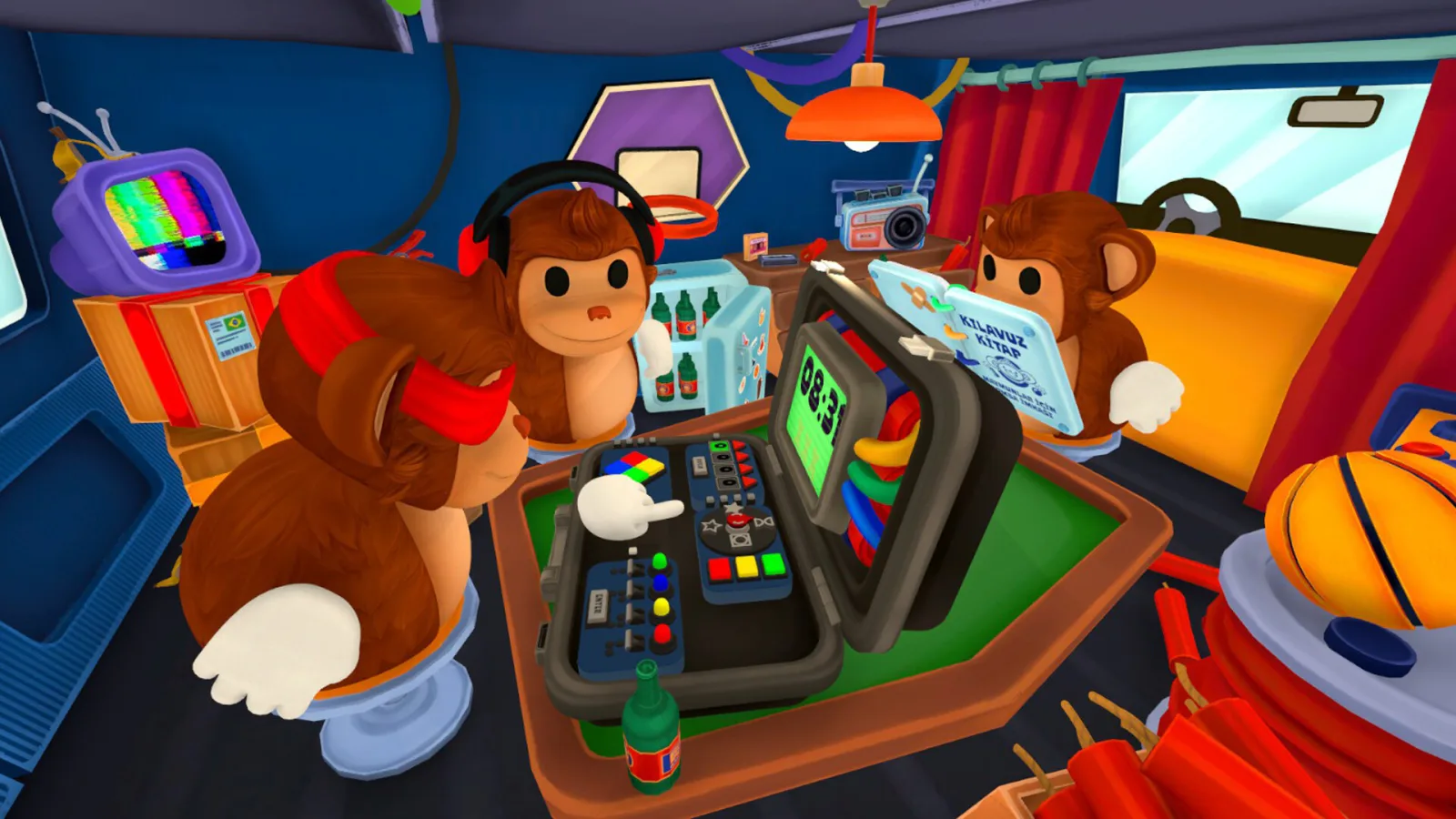
The game is built on the concept of "asymmetric information." This means that no single player has all the tools necessary to defuse the bomb. One has the "hands," one has the "eyes," and one has the "knowledge." If one player lags out or leaves, the communication chain breaks, and the bomb inevitably explodes.
Why Three Players?
The developers designed the game around the "Three Wise Monkeys" motif (See No Evil, Hear No Evil, Speak No Evil).
The Blind Monkey: Can touch the bomb but cannot see the modules or colors.
The Mute Monkey: Has the manual but cannot use voice chat or speak.
The Deaf Monkey: Can see the bomb and speak, but cannot hear the teammates.
This setup creates a "communication loop" where information must pass through specific filters. For example, the Mute Monkey must gesture to the Deaf Monkey, who then speaks to the Blind Monkey to tell them which wire to cut.
How to Set Up a Multiplayer Session
Setting up a match to test bombanana crossplay or standard online co-op is straightforward but requires coordination. Since the game relies so heavily on specific roles, make sure your squad is ready before launching the lobby.
Steps to Play with Friends:
Launch the Game: Ensure all three players have the game updated to the latest version.
Create a Lobby: One player acts as the host and creates a private room.
Invite Your Squad:
On Roblox, use the "Invite Friends" button in the Roblox overlay.
On Steam, use the "Remote Play Together" (if applicable) or standard Steam Friends invites.
Assign Roles: Once all three are in the lobby, you must decide who will be the Blind, Mute, and Deaf monkeys.
Select Game Mode: Choose between Campaign, Endless, or Custom modes.
Communication is Key
Even if you are using external voice chat like Discord, the game’s mechanics may restrict your ability to hear or speak to certain teammates based on your assigned monkey role. Embrace the chaos rather than trying to bypass it for the best experience!
The Three Roles: A Detailed Guide
To master bombanana crossplay sessions, you need to understand the limitations of each role. The "anti-friendslop" nature of the game means that misunderstandings are a feature, not a bug.
🙈 The Blind Monkey (The Interaction Specialist)
The Blind Monkey is the only one who can actually click on the bomb and manipulate the modules. However, their screen is obscured or simplified. They cannot see colors, and they cannot read the text on screens.
What they do: Cut wires, press buttons, turn dials.
What they need: Verbal instructions from the Deaf Monkey.
Common Error: Acting before receiving full confirmation, leading to immediate detonation.
🙊 The Mute Monkey (The Manual Reader)
The Mute Monkey is the "brain" of the operation. They have the bomb disposal manual, which contains the logic puzzles required to solve each module. However, they cannot speak.
What they do: Look up rules (e.g., "If the bomb has a serial number ending in an odd digit, cut the second wire").
What they need: To see what the bomb looks like (via the Deaf Monkey) and then signal the solution.
Common Error: Pointing at the screen and forgetting that the Blind Monkey can't see them.
🙉 The Deaf Monkey (The Communicator)
The Deaf Monkey is the bridge. They can see the bomb clearly and they can talk to the Blind Monkey. However, they cannot hear anything their teammates say.
What they do: Describe the bomb's appearance to the Mute Monkey and relay instructions to the Blind Monkey.
What they need: To watch the Mute Monkey’s gestures and body language.
Common Error: Misinterpreting the Mute Monkey’s frantic waving.
Role
Can See Bomb?
Can Hear Team?
Can Speak?
Can Interact?
Blind Monkey
No (Limited)
Yes
Yes
Yes
Mute Monkey
No (Manual only)
Yes
No
No
Deaf Monkey
Yes
No
Yes
No
Game Modes and Environments
Whether you are enjoying bombanana crossplay on Roblox or playing the standalone version, there are several ways to experience the game. The developers have included 30 handcrafted campaign levels, but the real challenge lies in the procedural modes.
1. Campaign Mode
This is the best place to start. It introduces modules slowly, starting with simple wire-cutting and moving toward complex logic gates and rhythmic puzzles. The difficulty curve is designed to test your communication methods as much as your puzzle-solving skills.
2. Endless Mode
In this mode, the bombs are procedurally generated. As you successfully defuse one, the next one appears with more modules and less time. This is where "pro" squads test their efficiency. Community reports suggest that the world record for endless mode involves a highly specialized set of hand signals between the Mute and Deaf monkeys.
3. Custom Mode
Custom mode allows you to tweak the variables. If your friendship is already on thin ice, you can increase the timer. If you want a challenge, you can add environmental hazards like power outages (which hide the bomb from the Deaf monkey) or loud noises (which further disrupt communication).
Friendship Jeopardy
This game is often called an "argument simulator." Expect peak levels of unjust accusations. Remember: it's just a game, even when your friend "accidentally" slaps you instead of giving you the manual!
System Requirements and Technical Specs
Before worrying about bombanana crossplay, ensure your hardware can handle the game. The stylized, low-poly aesthetic makes it accessible for most modern machines, including the Steam Deck.
Windows vs. macOS Requirements
Feature
Windows Minimum
macOS Minimum
OS
Windows 10/11 (64-bit)
macOS 11.0 (Big Sur)
Processor
Intel Core i3-6100
Apple M1 / Intel Core i3
Memory
8 GB RAM
4 GB RAM
Graphics
Intel HD Graphics 520
Apple M1 Integrated / Intel Iris
Storage
300 MB
600 MB
For the best experience, especially when using bombanana crossplay on Roblox, a stable broadband internet connection is mandatory. Since the game relies on real-time physics and emotes, high latency (ping) can cause modules to desync, leading to unfair explosions.
Advanced Communication Strategies
Since the game limits your natural senses, players have developed "meta" strategies to succeed. These are especially useful in bombanana crossplay lobbies where players might be using different input methods (like a controller on console vs. a mouse on PC).
The Emote Language: The Mute Monkey should assign specific emotes to common instructions. For example, a "Thumbs Up" could mean "Yes/Correct," while a "Wave" could mean "Next Module."
The Slap System: Sometimes, the only way to get attention is a well-timed slap. Players use slaps to indicate urgency or to stop a teammate from making a fatal mistake.
Color Blind Support: The developers have included a robust Color Blind Mode. This is essential because many puzzles rely on wire colors. Even if you aren't color blind, turning this on can provide text labels that make communication much easier for the Blind Monkey role.
For more official updates and community discussions, you can visit the BOMBANANA Steam Page to see the latest patch notes and developer logs.
Why BOMBANANA! is the Ultimate Co-op Test
Most co-op games allow players to work independently toward a shared goal. BOMBANANA! does the opposite. It forces total dependency. You are only as good as your weakest link. If the Mute Monkey misreads a page, the whole team dies. If the Deaf Monkey misses a verbal cue, the whole team dies.
This creates a unique psychological tension. The fun isn't just in winning; it's in the hilarious post-game breakdown where everyone tries to explain what they were trying to say. Whether you are playing via bombanana crossplay or sitting in the same room, the experience is designed to be memorable, chaotic, and ultimately rewarding when you finally see that "Defused" screen.
FAQ: Frequently Asked Questions
Does BOMBANANA! support crossplay between Steam and Roblox?
Currently, bombanana crossplay is only supported within the specific ecosystem you are playing in. Roblox players can play across PC, mobile, and console. Steam players (Windows and Mac) can play together, but there is no official bridge between the Roblox version and the Steam version at this time.
How many players do I need to play BOMBANANA!?
You need exactly three players. The game is designed as a 3-player asymmetric co-op experience. There are no solo or duo modes, as the roles of the Blind, Mute, and Deaf monkeys are all essential to solving the puzzles.
Is there local co-op or split-screen?
No, the Steam version currently only lists Online Co-op. Because each player needs to see (or not see) different information on their own screen, a traditional split-screen mode would be very difficult to implement without spoiling the challenge.
Can I play BOMBANANA! on the Steam Deck?
Yes! The game is Steam Deck Verified. This allows for a great portable experience, though you will still need two other friends online to complete your monkey squad.
Is there a VR mode for BOMBANANA!?
While the Steam page includes tags for VR, the primary gameplay is designed for standard screens. VR support may offer a more immersive way to experience the roles, especially for the Deaf Monkey who needs to see the environment clearly.